
Product Designer • PM, 4 Developers • Fall 2025
SIMnet Assignment Manager
For 40,000+ faculty each semester, customer specialists were the only way to manage 20M+ student assignments. I led the Assignment Manager redesign, from the architecture down to the interactions, so that they can edit and organize on their own.
14% to 33%
Week 2 retention
20% to 90%
Task completion
Reduced by 40%
Specialist ticket volume
Try Live Prototype
Context
SIMnet is McGraw Hill’s learning platform for computer software, and assignment management is where instructors live and breathe. Despite being the most-used feature in the product, it consistently ranked last in NPS.
Instructors hit two walls: finding features and using them
Customer specialists I spoke with shared similar stories about instructors most often needing help on already available features, and the analytics backed them up. When I tasked instructors (n=10), I uncovered the ones they struggled most on.
Requested in every 4 out of 10 instructor support tickets
23% avg successful funnel between edit, organize, or view
Only 20% could bulk-edit and organize on their own in testing
Instructors like Pam resorted to tedious workarounds
The 5 instructors I interviewed brought clarity to what was challenging about management. For instructors like Pam, even when she navigated to the right space, she resorted to editing assignments one at a time just to get things done.
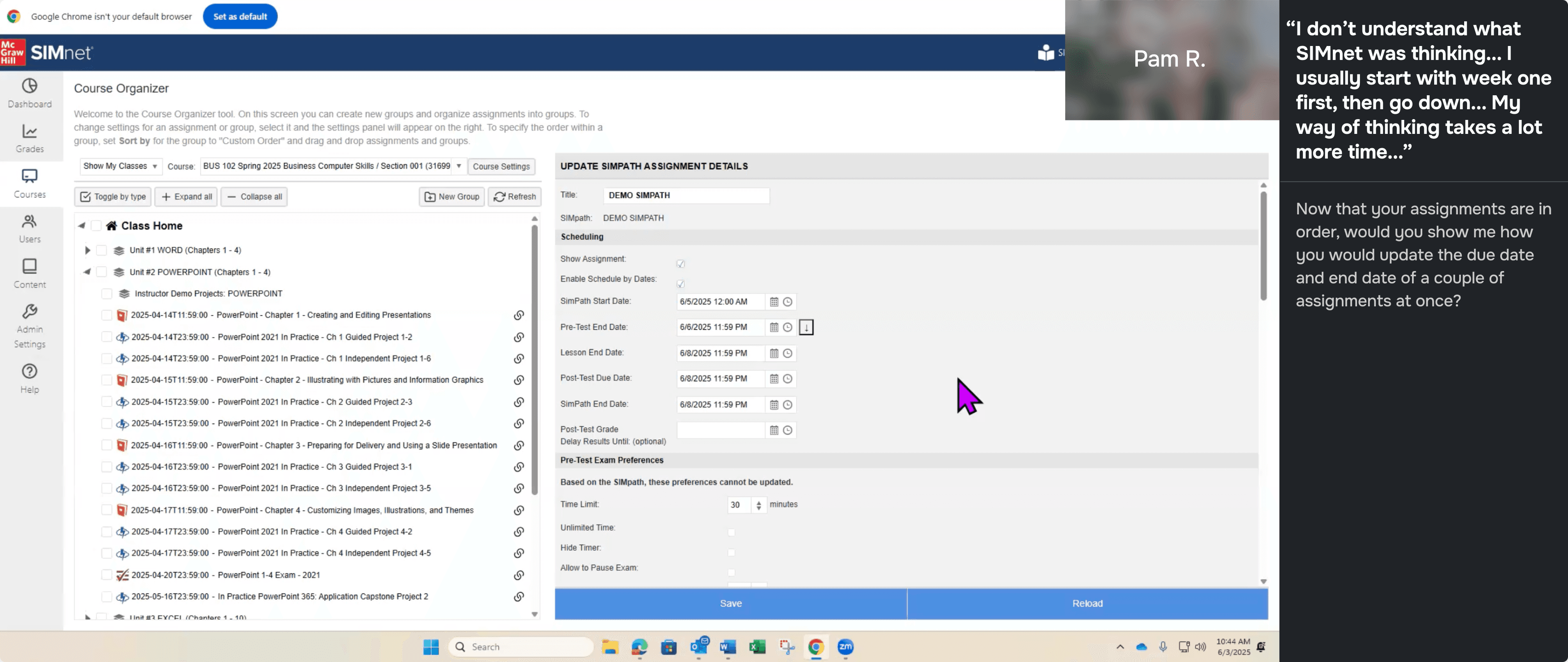
How might we help instructors find and use assignment management features on their own?
Discovers one workspace, assumes that's all there is
Hits a task it can't do, unsure where else to look
Calls support for a feature they can't find
Eventually navigates to the right workspace
Still can't complete task, actions are buried and unexpected
Calls support for a feature they can't figure out
One workspace eliminates instructors needing to context switch
I unified everything into a tree grid – the same pattern used in Jira, Canvas, and Google Drive, with folders always visible and every action reachable without switching spaces.

Bulk Actions
Nested Assignments
Organizing
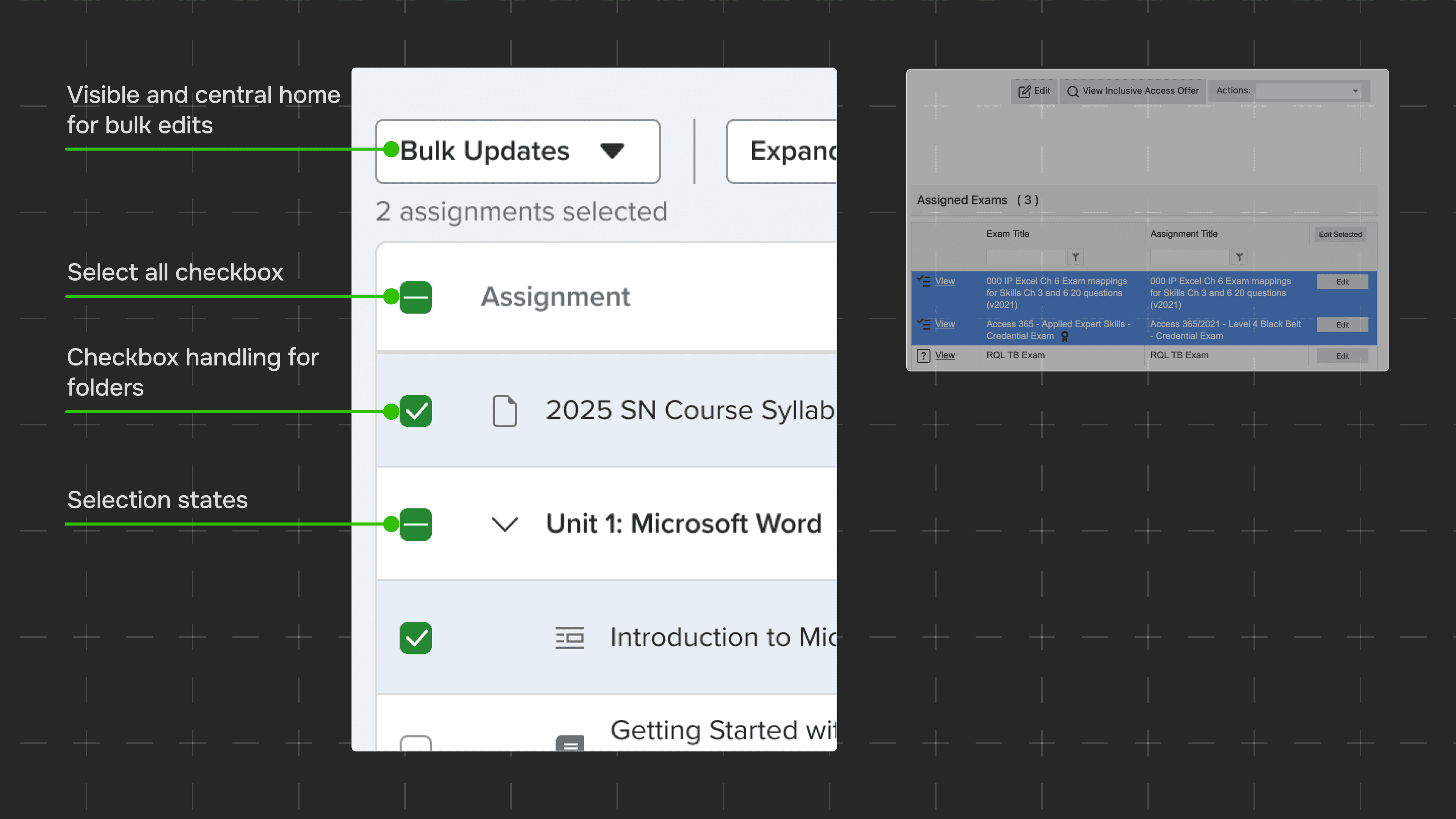
Bulk editing gets placed where instructors look first
In the existing product, bulk editing was hidden under drag selections. Since it's a core action, I iterated on finding the right home for it.
Bottom action bar
4 out of 15 instructors expected the actions column to perform a bulk action, not the bar below.
Top left bulk-actions
" height="15.306578032156228px" id="Yc1ceNc7y" width="16px"/></svg>)
All instructors successfully identified bulk scheduling and had the right expectations for how to activate it.
Dragging is expected to reorder, not select and take action
Instructors expect drag to reorder, so I used checkboxes for selections and bulk edits instead. I moved bulk actions to the top left, where half of our core actions already lived.
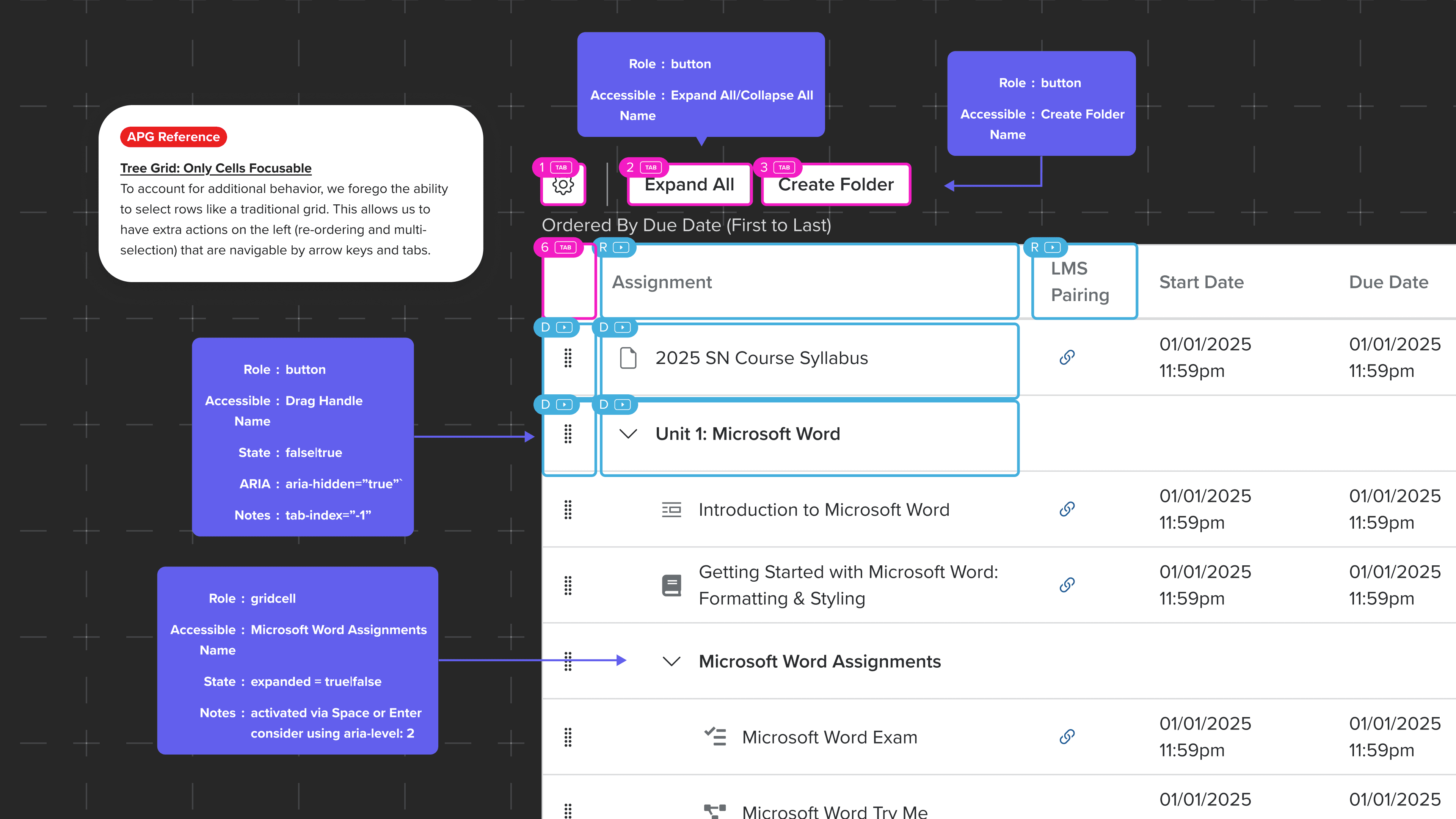
Nobody at the company could ship accessible drag-and-drop
My PM and team couldn't agree on a solution because accessible references and pre-built grids all had gaps that made them fall short. Across the whole org, teams were cutting features from roadmaps and removing drag interactions entirely to single-click solutions.

To break the deadlock, I learned both sides
I dove into WCAG 2.2 AA criteria alongside our product requirements, understanding both sides well enough to find where they could meet. Accessibility annotations usually happen near delivery, but I moved them earlier so decisions could be made with both sides at the table.
I assumed instructors wanted everything up front, but some still struggled
100% of instructors instantly found assignment tools
Bulk-editing, organizing, assigning and viewing were all clear.
One workspace was easier to understand than three
The unified layout eliminated confusion from context switching.
Having bulk-editing and organizing together was too much
With checkboxes and drag handles side by side, instructors struggled, assuming checkboxes would re-order.
Is a separate organize mode still discoverable?
Instructors usually organize their assignments and schedule at the start of a semester, so I pitched putting organize into a separate yet identical mode.
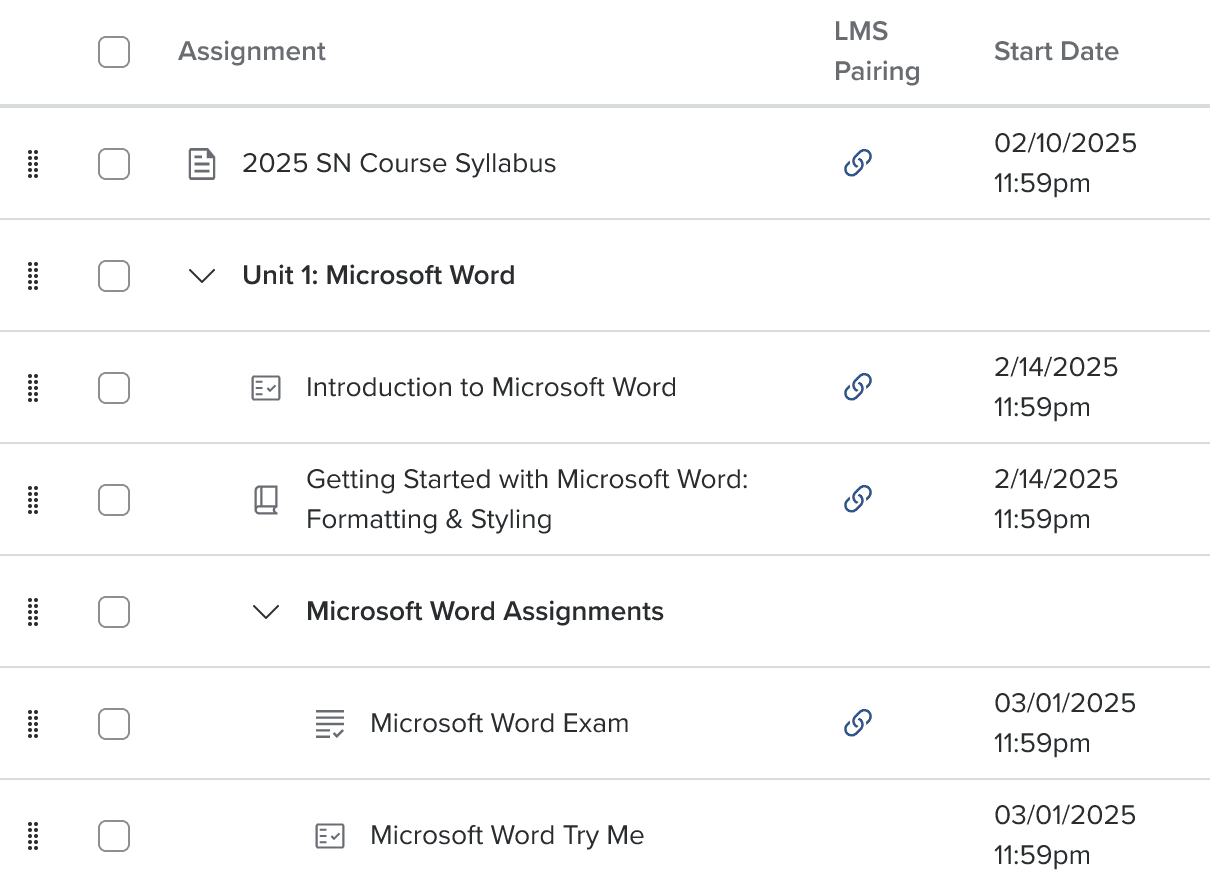
Both actions together
2 out of 5 instructors expected to bulk re-order with checkboxes. The other 3 weren't sure.
Separate modes
5 out of 5 instructors successfully navigated to organize mode. All had the right expectations for both modes.
The healthiest level of nesting is a compromise

If I had left nesting alone,
Folders could end up looking like this; a nightmare for anyone using it.

Assignments also show up in Canvas
Canvas (a parallel platform), has 1 level of nesting, and I wanted to mirror that.
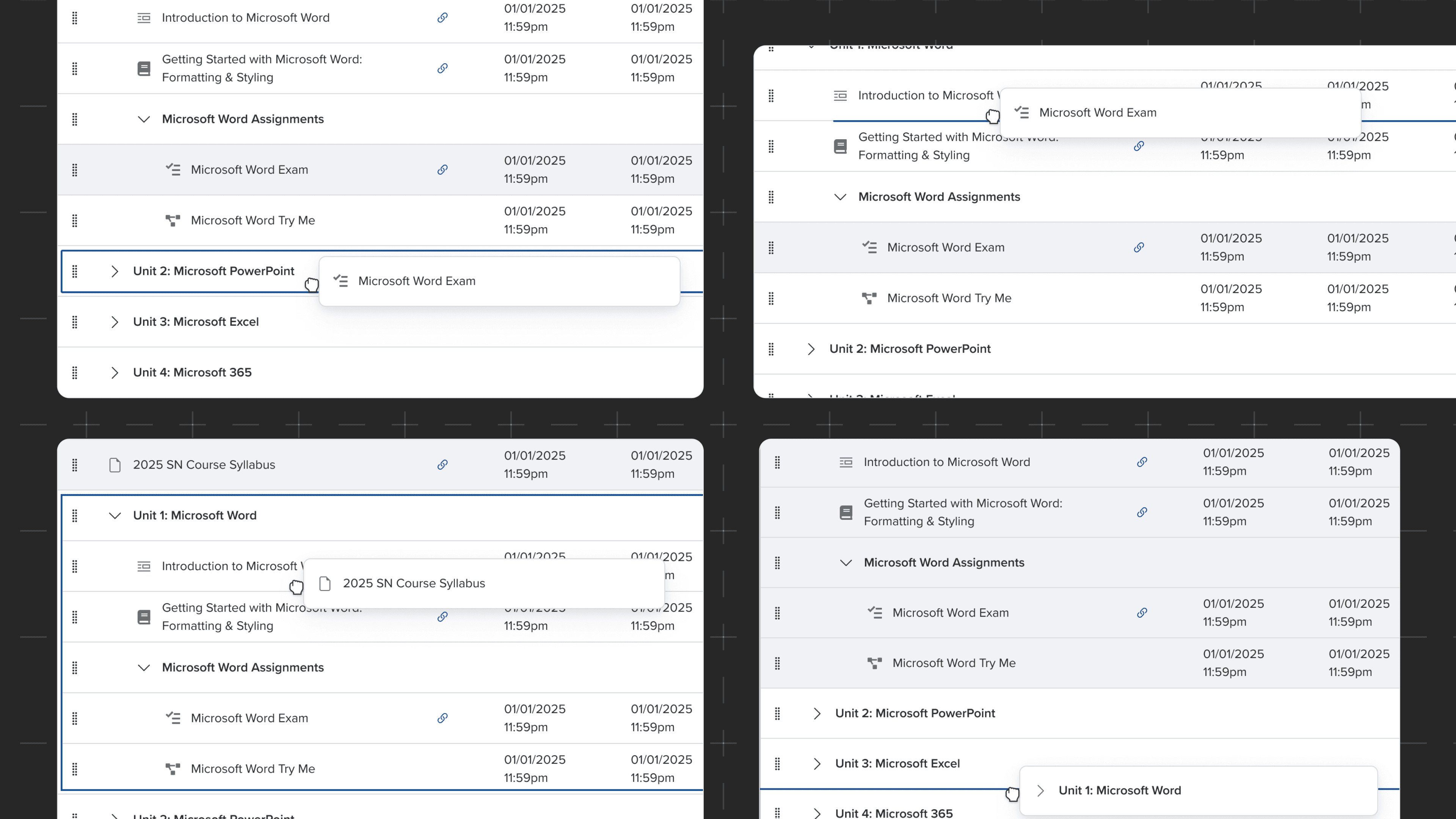
In reality, nested folders had heavy usage up to 3 levels and was a market differntiator, so I mapped edge cases with developers.
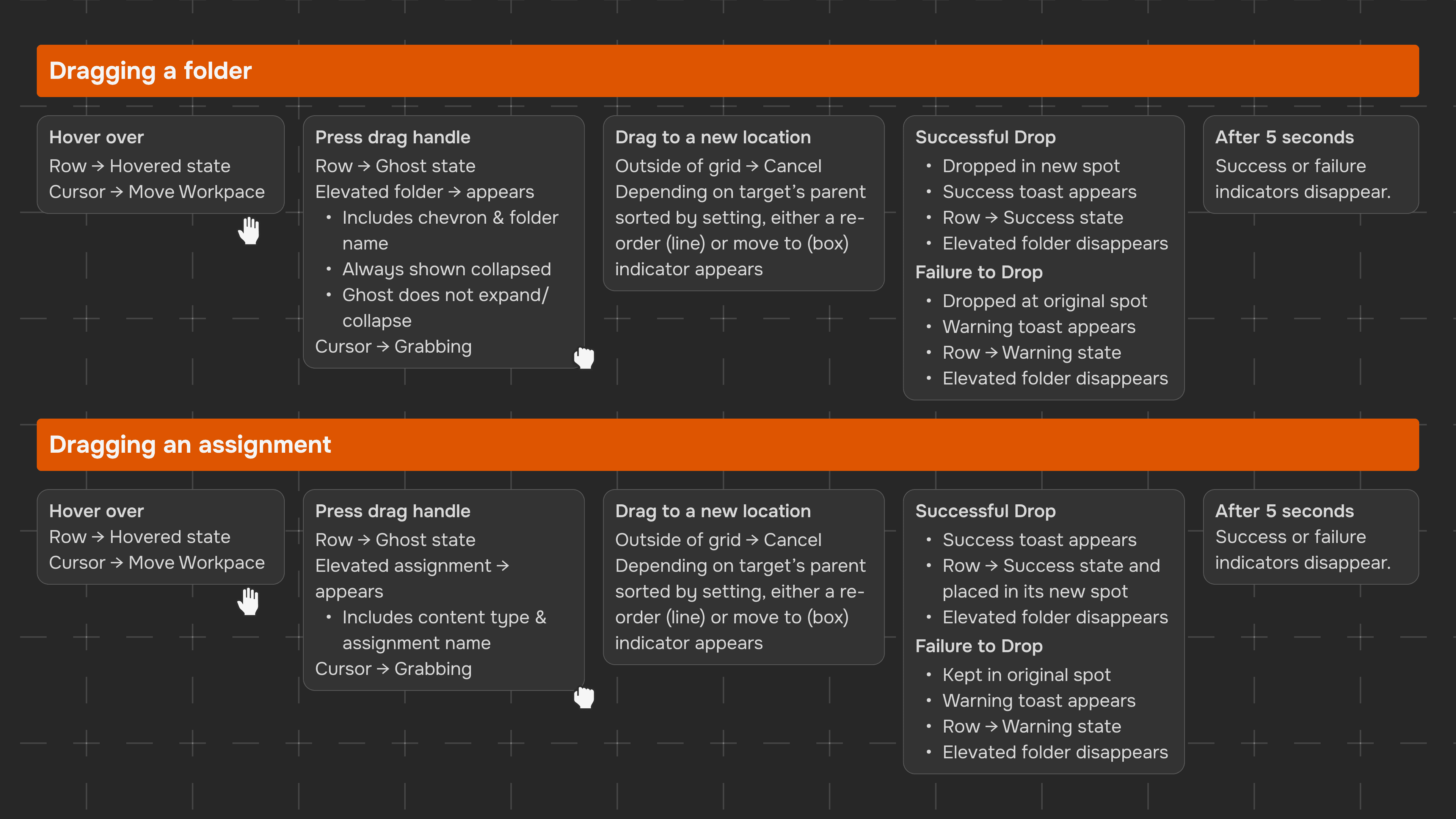
The final solution: two modes, one workspace
Stakeholders agreed, so I moved organize into its own space. An identical layout with drag handles instead of checkboxes made the transition feel familiar rather than learning something new. This removed confusion from them being together.
Task completion jumped 20% → 90%
The majority of Instructors could complete core tasks like bulk-scheduling and organizing.
Week 2 retention went from 14% (2025) to 33% (2026)
This was YoY in May, and I'm following retention during back-to-school season, and at the end of a semester to see if that number shifts.
Specialist ticket volume reduced by 40%
Since full commercial release in summer 2026, tickets related to bulk-editing and organizing have effectively dropped to 0, significantly decreasing support time.
What instructors said
"We all used the course organizer to move and update lessons—very intuitive."
"First, I really liked the look of it and the ease of making assignments. Changing dates in a group was so much easier."
"Scheduling assignments and adjusting scheduling options like due dates was easy and seamless."
9 designers & 4 products adopted my patterns
The accessible tree grid interaction patterns solved my team's deadlock, and 9 other designers on 4 different products used it as reference.

Instincts are a starting point, not a conclusion
I was convinced instructors wanted everything in one workspace; it's how I'd want it, and how anyone comfortable with modern software tools would expect it to work.
Testing with instructors, however, told a different story, and I had to stay curious enough to let the data lead. The best solution wasn't the one I started with or the one I validated in the middle. It was the one testing found for us.
Know your product partners as well as you know your users
